
Why U.S. Schools Are Still Running on Spreadsheets, and What a Real ERP Actually Fixes
A few years back, I sat in a requirements session with the administrative staff of a mid-sized private school, and about forty minutes in, the office manager pulled up her screen to show me how she tracked tuition payment plans. It was a spreadsheet with eleven tabs. One tab per grade level, colored cells for who’d paid, a separate tab cross-referencing sibling discounts, and a formula she’d built herself, years earlier, that nobody else in the building fully understood anymore. She wasn’t embarrassed about it. If anything, she was proud — it worked, it had worked for six years, and she’d built it because nothing else available to her actually fit how the school operated. That’s the moment that’s stuck with me from that engagement, because it captures something I keep running into across school administration work: the problem was never that this woman lacked competence. The problem was that she’d been left, for years, to solve an operations problem that should never have been one person’s spreadsheet to maintain.
That’s the story behind most of the ERP conversations I’ve had with schools since. It’s rarely “we don’t have a system.” It’s “we have four or five systems that don’t talk to each other, plus a set of spreadsheets holding the whole thing together, plus one person who understands how it all connects and is a genuine single point of failure if she ever leaves.”
What “no real ERP” actually costs a school
I think a lot of people outside education assume schools, especially K-12, are simple operationally — enroll students, take attendance, record grades, done. In practice, the administrative surface area of a school is closer to a small business with unusually high stakes for getting things wrong. You’ve got enrollment and admissions, tuition and financial aid tracking, attendance tied to state reporting requirements, gradebooks that need to feed transcripts, special education documentation with its own compliance obligations, transportation logistics, cafeteria accounts, facilities scheduling, and parent communication that needs to reach people through wildly different channels depending on the household. Most schools I’ve worked with are running a separate point solution for each of those, purchased at different times by different people, none of which were selected with an eye toward integration.
The cost of that fragmentation doesn’t show up as one dramatic failure. It shows up as a hundred small ones. A student transfers mid-year and three different systems have three different versions of her enrollment date. A family’s tuition payment plan changes and the front office has to manually update it in the billing system and separately email the finance office because the two don’t sync. A teacher enters grades in one platform, but report cards get generated from a different one that was last synced two weeks ago, and nobody notices until a parent calls asking why their child’s math grade doesn’t match what the teacher told them at conferences. None of these are catastrophic on their own. Collectively, they consume enormous staff time, in institutions that are almost always operating with thin administrative headcount to begin with.
Why schools end up here in the first place
I don’t think this happens because school administrators are bad at technology decisions. It happens because the purchasing pattern for most schools is reactive rather than architectural. A school buys a student information system because it needs one for state reporting. Later, it buys a separate billing platform because the SIS’s financial module is weak. Later still, it adopts a communication tool because parents are asking for text updates and neither existing system handles that well. Each individual decision made sense in isolation. Nobody was ever tasked with asking whether these systems would eventually need to share data, because at the time each was purchased, that wasn’t the immediate problem being solved.
I’ve watched the same pattern play out in corporate CRM environments for years — departments buying point solutions to solve an immediate pain, with integration treated as someone else’s future problem. Schools aren’t unique in falling into this trap. What makes it more consequential in a school setting is that the eventual cost isn’t just operational inefficiency. It’s staff time that should be going toward actual student and family support instead of manual data reconciliation, and it’s real risk around compliance reporting when the “source of truth” for enrollment or attendance data is genuinely unclear because it lives in four places that don’t agree with each other.
What a properly built school ERP actually needs to do
When I use the term ERP in this context, I don’t mean a single monolithic platform that tries to do everything with mediocre depth in each area, which is a real risk with some off-the-shelf options that promise to replace every existing tool at once. What I mean is a coherently architected system where enrollment, billing, attendance, academic records, and communication share a single data model, so that when a fact changes in one place — a student’s enrollment status, a family’s contact information, a payment plan adjustment — it’s accurate everywhere else automatically, without someone manually re-entering it three times.
Take a look at this screenshot of dashboard of an ERP developed by SlideScope:
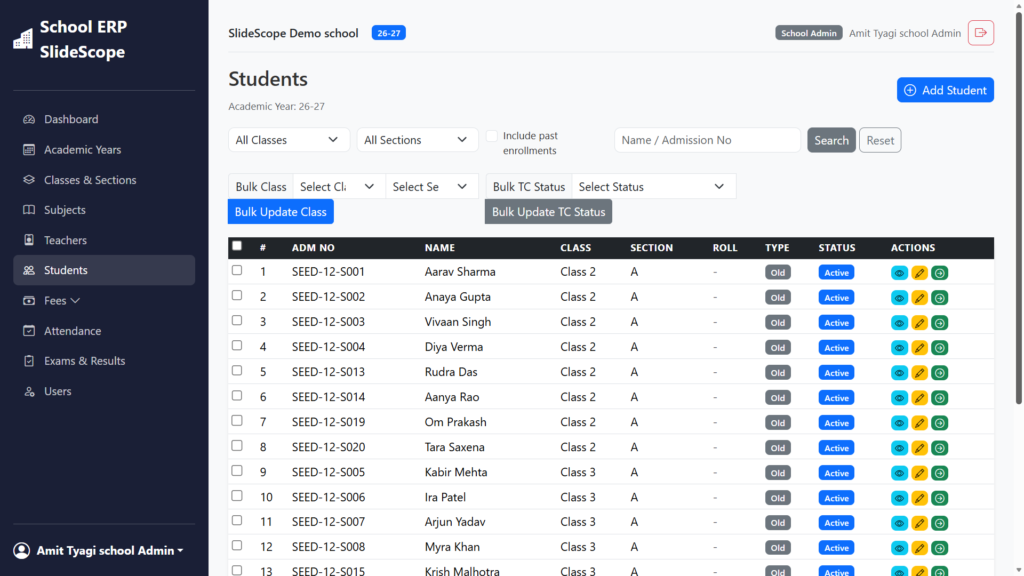
Here’s a look at SlideScope’s Student module, and honestly, this is what a well-structured ERP data model looks like. Every core school function — Academic Years, Classes, Fees, Attendance, Exams — sits as its own clean sidebar entity, not buried in menus. The student table alone shows disciplined design: admission numbers, bulk class/status updates, and status badges all visible at a glance. That’s requirements-driven architecture, not an afterthought.
The specific requirements vary by school type and size, but a few things come up consistently in the requirements-gathering work our team does with school clients:
- A single source of truth for student and family records, so enrollment status, contact information, and billing details don’t drift out of sync across departments.
- State reporting built in as a first-class function, not an export workaround. A lot of the pain schools describe to me comes from systems that technically hold the required data but require someone to manually reformat it every reporting period because the export function wasn’t built with the actual state reporting schema in mind.
- Role-based access that matches how staff actually work, so a teacher can update grades without seeing tuition data, and a finance office staffer can manage billing without needing access to special education documentation, without administrators having to manage a patchwork of permissions across five separate systems.
- Parent-facing communication that pulls from the same data, so a message about an overdue balance, an attendance concern, or a schedule change is generated from the same underlying record the school itself is working from, rather than a separate system that occasionally falls out of sync.
- Genuine reporting and dashboards for leadership, built on live data rather than a monthly manual export into a spreadsheet someone has to assemble by hand — which, ironically, is often how administrators end up back where that office manager I mentioned earlier started.
Where this becomes an engineering problem, not just a purchasing decision
Here’s where I think a lot of schools get stuck: the market has plenty of individual point solutions, and plenty of large all-in-one platforms, but a genuinely well-architected system that fits a specific school’s actual operational reality, existing data, and budget often isn’t sitting on a shelf ready to buy. It requires real engineering work — mapping the school’s current data across its existing systems, designing a data model that actually reflects how the school operates rather than a generic template, building integrations where wholesale replacement isn’t practical or affordable, and doing careful, patient data migration so historical student records don’t get corrupted or lost in the transition, which is a legitimate and serious fear for any school considering a system change.
This is where our engineering team at Global Geographic tends to get involved, and it’s meaningfully different from a standard software sales conversation. We start the same way I’d start any serious requirements engagement — mapping what the school actually has today, system by system, and more importantly, mapping the workarounds staff have built around the gaps, because those workarounds usually reveal the requirements nobody wrote down anywhere. From there, our developers build toward a system architecture that fits the school’s actual scale and budget, whether that means a custom-built platform, a thoughtfully integrated combination of existing tools connected through proper data pipelines, or a phased migration that doesn’t force a school to abandon working systems before a replacement is fully validated.
The engineering discipline matters here in a way that’s easy to underestimate. Student data carries real privacy obligations under FERPA, financial data needs to be handled with the same rigor you’d expect from any billing system, and the migration itself has to be done carefully enough that a school never faces a scenario where historical records are incomplete or inaccurate during the transition. This isn’t a project where “move fast and fix it later” is an acceptable approach, given what’s actually at stake for the families and students whose records are involved.
What I’d tell a school considering this
If I’m advising a school on this decision, my first recommendation is almost never “here’s the platform to buy.” It’s to spend real time mapping what’s actually happening today, workarounds included, before evaluating any system, custom or off-the-shelf. That office manager’s eleven-tab spreadsheet wasn’t a failure of judgment. It was a genuine requirement that had never been properly captured and solved. Any ERP conversation that skips straight to platform features without first understanding exactly what problem staff are quietly solving on their own is going to miss something important, and that something usually resurfaces months after go-live, in exactly the way I’ve seen happen in other implementations when the underlying requirements work gets rushed.
Once that mapping is done, the right system, whether custom-built or carefully integrated, tends to become a lot clearer, and the engineering work becomes a matter of building toward a well-understood target rather than guessing at requirements as they emerge. That’s the kind of work our team does with schools, and it’s the difference, in my experience, between a system that genuinely reduces administrative burden and one that just becomes another item on the list of tools nobody fully trusts.
Note for readers: Client scenarios described in this article are illustrative composites drawn from common patterns seen across business analysis and software implementation work, not references to any specific identifiable client or engagement.